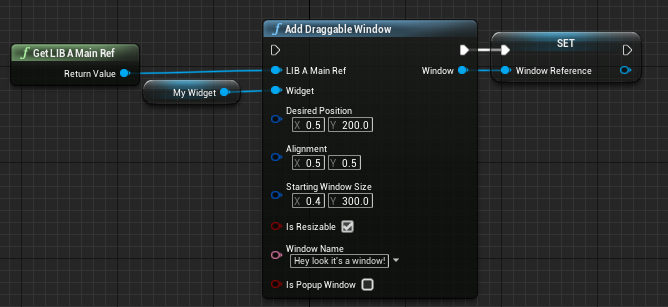
AddDraggableWindow
| Function name | AddDraggableWindow |
|---|---|
| Function Library | Content/DRGLib/DraggableWindow/LIB_F_DraggableWindow |
| Inputs | LIB_A_MainRef(LIB_A_Main Object Reference)Widget(UserWidget object reference) The widget to put inside the windowDesiredPosition(Vector2D Structure) The position to place the window onscreenAlignment(Vector2D Structure) How to align the window against the desired positionStartingWindowSize(Vector2D Structure) How big the window should be when originally placedIsResizable(Boolean) Whether we allow the window to be resized by the end user. WindowName(Text) The name to appear in the title bar of the window |
| Outputs | Window(LIB_W_DraggableWindow Object Reference) The generated window |
This function generates and places a draggable window on screen
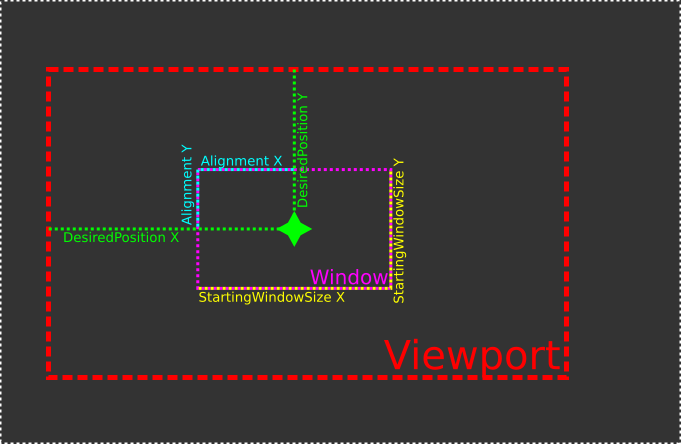
DesiredPosition and StartingWindowSize will both treat values from 0-1 as fractions of the total viewport size. This is per-axis, so it’s possible to do something like StartingWindowSize=[200,0.5], with those values representing a window that is half of the total height of the viewport while only being 200 slate units wide
Alignment Will always treat the inputted value as a fraction of the window’s initial size onscreen
IsResizable Handles whether the user is allowed to resize the window. This will not block the SetWindowSize function. Accomplished by showing/hiding the appropriate buttons
Widget is your custom widget you wish to place inside the draggable window
The below diagram explains the relations between the different variables. If you’re familiar with CanvasPanels, think of DesiredPosition as the anchor point
Example usage: